
- or
No existing idea results
- ~ No ideas found ~
4757 results found
-
Allow ticket Creation when the send-to address is in the BCC Line
Currently Automatic ticket creation https://support.atera.com/hc/en-us/articles/360012444033-Forward-Email-for-Automatic-Ticket-Creation-in-Atera does NOT happen if the @ticketing.atera.com address is on the BCC line of the email. Sure, it works fine on TO: and CC: but if you want to sneak in a ticket on your reply email by BCC'ing the forwarding email, it will just get black-holed by Atera, and no ticket will be created.
3 votes -
Ability to bill time entries rather than entire ticket
Bill time entries rather than tickets: Be better if we could say: billed tickets that have not been closed and then we could bill to date. Whether the time entries has been billed or not. Being able to flag which ones have been built. Has it been invoiced yes or no. You will bill the time entries and not the ticket. You want to link the billing to the time entries and not the ticket.
31 votes -
Hide Microsoft Defender Signature notifications on the "devices" tab
Add the ability to disable showing Microsoft defender Signature Updates.
Since I use ateras patching on my customers machines, patches get installed through atera profiles. Defender Antivirus signature are not affected by the patch automation profiles and get installed as fast as possible by default.
So I think it is a good idea to make it possible to hide the notifications on the "devices" tab in Atera.
1 vote -
Subscription customisation
It might be a good idea not to allocate subscriptions to a specific account but to the number of times you can connect to the Atera portal.
For example :
If we take 3 subscriptions to Atera:
- One subscription reserved for the portal admin
- Two subscriptions active for 4 techs but not active at the same time (two techs active at the same time)In small MSP structures, a tech may be away at a customer site and therefore does not need the licence assigned to his account, but perhaps another tech in the office would need it.
1 vote -
Calendar Integration
I'd like to see the possibility of integrating Infomaniak calendars or directly with an Outlook-type desktop application. There is already synchronisation with the Infomaniak calendar and Outlook if that helps.
1 vote -
password manager
Enable generating a totp code within password manager for client passwords stored in password manager
21 votes -
MacOS mass deploy through MDM (such as Intune).
I would like to be able to push out a client specific MacOS Atera Agent through an MDM such as Intune. Either through a script or a client specific Atera Agent. We could then push the .pkg through Intune. Right now, it's just a generic .pkg installer and the terminal command option does't appear to work as a script.
10 votes -
Login to Atera with Windows Hello through Auth0 on multiple devices.
Please consider allowing more than 1 device to login to Atera with Windows Hello credentials through Auth0.
19 votes -
Atera should provide generic 'How To' KB articles for the common user so we, the MSP, don't have to start from scratch.
For the MSP just starting out, there are a ton of task we must complete in Atera as well as onboarding clients, marketing, billing, etc. One less thing on our plate! And please update the KB section.
3 votes -
Search inside single Knowledgebase Category
Some of us use Knowledgebase as Documentation portal, need to be able to define a Root Category to search articles under.
7 votes -
To export history of a ticket in PdF
To have a feature to export history of ticket and detail of each conversation in descending order
2 votes -
Timesheet reports merge different information into the same cell.
Your Timesheets reports merge different information into the same cell. For instance, to make it easier to import a csv file export from Atera into any accounting system, information from Atera should be exported with just specific information requested. Currently, an export from Atera merges ticket time with the date. This forces us to do extra work to split that that data up from the cell. Why can't you just organize the data into specific categories? Time and date are two distinct and different bits of information. I already get the time entries in a different field. Why is it also included under the date? The same thing happens under the Description of a ticket. Instead of just giving me the description, you also add the date and time along with the description. This is an ongoing issue and should be a simple fix for Atera. Give me the data I specifically request and do not mix data into the same field.
Your Timesheets reports merge different information into the same cell. For instance, to make it easier to import a csv file export from Atera into any accounting system, information from Atera should be exported with just specific information requested. Currently, an export from Atera merges ticket time with the date. This forces us to do extra work to split that that data up from the cell. Why can't you just organize the data into specific categories? Time and date are two distinct and different bits of information. I already get the time entries in a different field. Why is it…
4 votes -
port
Change Port Availability field on the auditor reports - right now it looks as if all your major ports (21, 25, 80, etc.) are OPEN because of the green check mark, but in actuality the green check mark means that they are CLOSED. I would appreciate if the port availability section was just a little more explicit and said OPEN or CLOSED. This seems to have changed from November 2022!
1 vote -
View AgentID in the GUI
When you view a customer, the CustomerID shows in the URL.
When you view an agent, the AgentGUID shows in the URL.When working with the API, you require the AgentID. Please expose this via the GUI.
1 vote -
Ticket Automation rules for Offline Technicians
We have a ticket automation rule setup where all tickets go to a specific tech first, and then the tech re-assigns the ticket to other techs according to the issue. However if that technician is out of the office for the day, the other techs need to keep an eye on their ticket inbox. It would be nice to have a condition added to the automation rules where if that tech is offline, the ticket automatically goes to another techs ticket cue.
For example, Our current setup is the following: A new email is sent to our support email. The ticket is automatically assigned to Tech A.
What I propose is if Tech A is absent, the ticket automatically assigns to Tech B. If Tech B is absent, the ticket assigns itself to Tech C, and so on and so forth depending on how many 'rules' you want to add to the automation. I assume Atera has the ability to detect who is online, or not.
We have a ticket automation rule setup where all tickets go to a specific tech first, and then the tech re-assigns the ticket to other techs according to the issue. However if that technician is out of the office for the day, the other techs need to keep an eye on their ticket inbox. It would be nice to have a condition added to the automation rules where if that tech is offline, the ticket automatically goes to another techs ticket cue.
For example, Our current setup is the following: A new email is sent to our support email. The…
1 vote -
Tickets API Calls
API Calls: add a data filter option for Tickets
16 votes -
Custom cname in agent download URL
When creating an agent installer for an end customer the URL which is generated is with https://app.atera.com/ but it also works with https://custom.cname.com/.
It would be nice if the download URL is automatically changed with this custom cname. This would improve the customer experience.14 votes -
Event Monitoring Improvement (v3)
Atera has made some great changes when monitoring Windows event logs, but there are still some features that would make it much more valuable.
I would like to be able to filter events based on the contents of their description. Let's say I'm monitoring the Application log for any events generated by the Application Crash and Application Hang sources. While this is helpful, it generates lots of noise and unnecessary alerts. Since there are a limited number of critical applications that I'm worried about, I want to specify those application names in the monitor so that Atera only generates alerts when those application names are found in the event description. For instance, I don't care if DellSupportAssistRemediationService.exe crashes, but I do care very much when Outlook.exe or Revit.exe crash. There are many apps that crash on Windows with a lot of regularity and most of those are inconsequential to me. Being able to filter this list down to just the ones I care about would make my alerts far more valuable.
I know there are other use cases for this too, like monitoring the Security log for AuditFailure events - in this case I would want to filter out any machine or system account and focus only on user accounts that have a human being associated with them. But there are other use cases as well. If you have one, please comment what it is!
Atera has made some great changes when monitoring Windows event logs, but there are still some features that would make it much more valuable.
I would like to be able to filter events based on the contents of their description. Let's say I'm monitoring the Application log for any events generated by the Application Crash and Application Hang sources. While this is helpful, it generates lots of noise and unnecessary alerts. Since there are a limited number of critical applications that I'm worried about, I want to specify those application names in the monitor so that Atera only generates alerts…
2 votes -
Launch Powershell Script when client back online
Is it possible to add the ability to run a script when a customer comes back online?
14 votes -
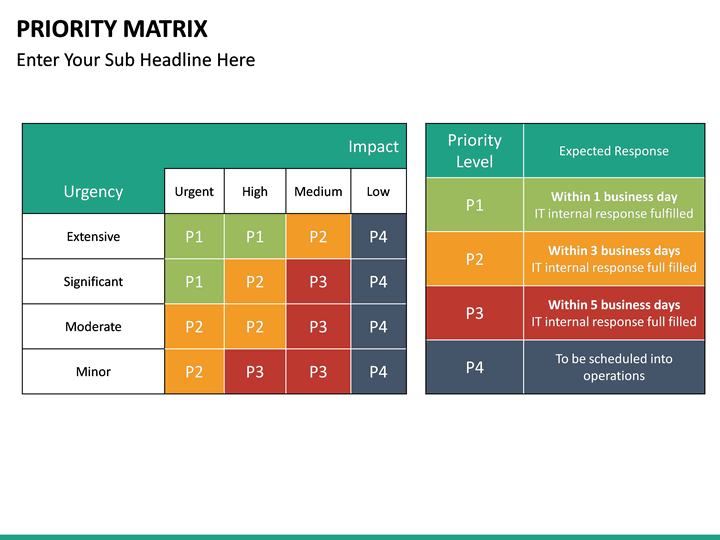
colour ticket priority
please provide colour scheme to tickets so they can be easily identified / distinguished based on their priority either by
1) marking the whole div/row as "red" when it's critical/high
2) having the priority values displayed with coloured bubles - similarly to status have ityou can use this schema for colour selection or any other thats suitable
note: I know there is a filter for that, but that's an additional step which can be easily eliminated
thank you
18 votes
- Don't see your idea?